
LOLER thorough examinations, without the paper
Core Inspection runs your full LOLER workflow: schedule examinations, capture findings on mobile, generate compliant Reports of Thorough Examination from your own template, and keep the audit trail HSE will ask for.
- Compliant ROTE from your DOCX template. Schedule 1 fields, equipment ID, defects, SWL, competent person declaration, all rendered into your branded format.
- Statutory intervals managed for you. 6-month and 12-month examinations scheduled per asset. Three-tier overdue alerts so nothing slips.
- Multi-stage approval before certificates issue. Reviewer and competent-person approvals routed through the system instead of chased over email.
- Failure handling that keeps you compliant. Failed examinations route to a manual review queue, suppress automatic certificate issue, and log the corrective action.
- Audit trail HSE expects. Every examination, change, photo, signature, and document attached to an asset: retained, exportable, defensible.
Trusted by LOLER inspection providers across the UK and beyond







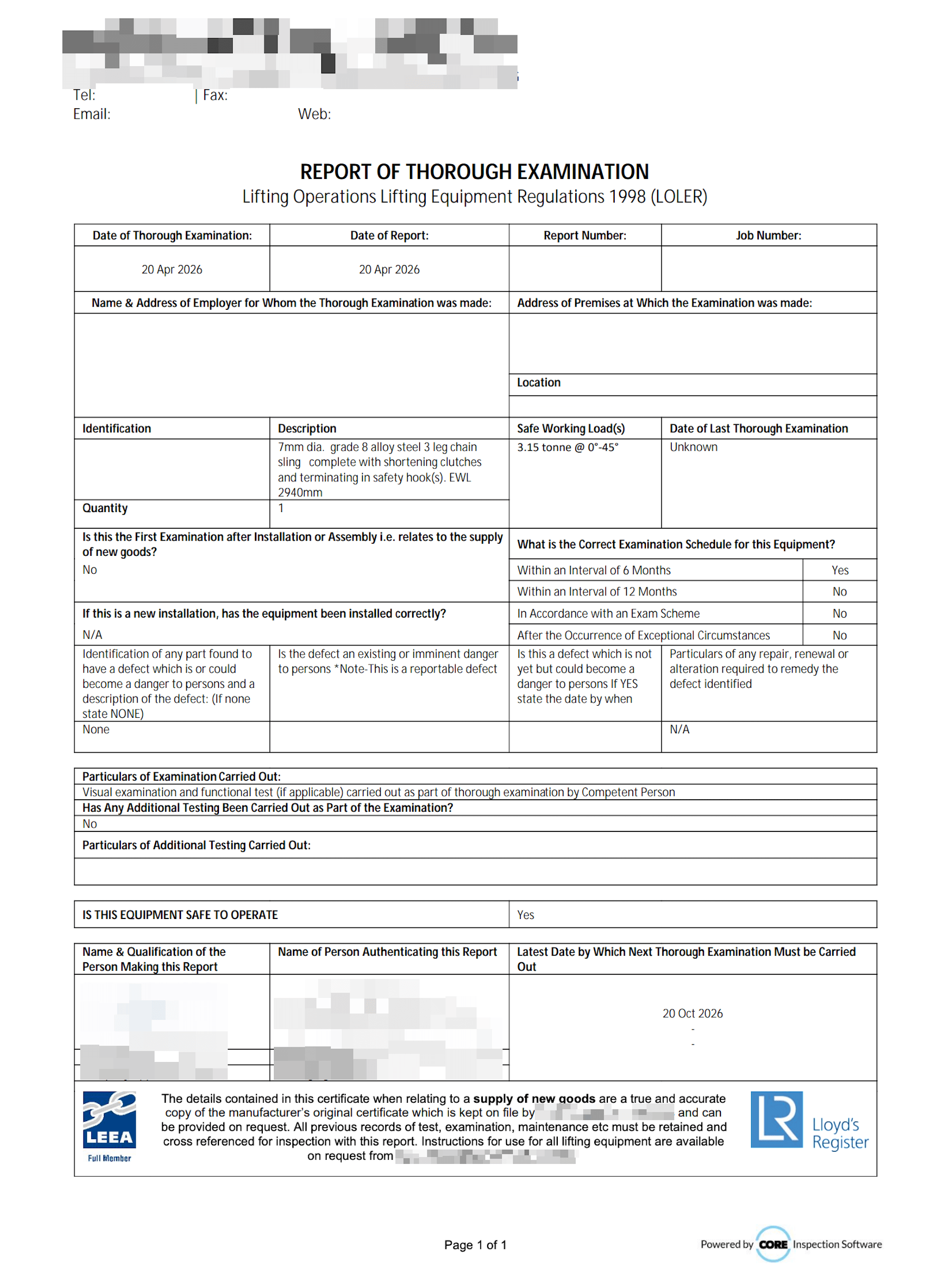
Compliant ROTE from your DOCX template
Schedule 1 fields, equipment ID, defects, SWL, competent person declaration, all rendered into your branded format.
Statutory intervals managed for you
6-month and 12-month examinations scheduled per asset. Three-tier overdue alerts so nothing slips.
Multi-stage approval before certificates issue
Reviewer and competent-person approvals routed through the system instead of chased over email.
Failure handling that keeps you compliant
Failed examinations route to a manual review queue, suppress automatic certificate issue, and log the corrective action.
Audit trail HSE expects
Every examination, change, photo, signature, and document attached to an asset: retained, exportable, defensible.
Multi-branch, multi-tenant ready
Run multiple branches with isolated reporting and per-branch branding. Built for inspection businesses that have grown.
What LOLER inspection software has to do
LOLER puts every sling, shackle, hoist, and crane on a statutory clock, and each examination ends in a written report with a fixed list of particulars. LOLER inspection software keeps those clocks, puts a competent person on each examination, captures the findings in the field, and produces the Report of Thorough Examination without anyone retyping it.
For a company that examines other people's equipment, the register spans hundreds of client sites, each client wants their own certificates the day the examination is done, and the examiner on the job has to hold the right competency for that class of equipment. Core is built for that business: scheduling, field examination, ROTEs, client portals, and the billing handoff in one system.
Regulations 9, 10 and 11, and what Core does with each
The three regulations an HSE inspector reads your records against.
| Requirement | What LOLER says | In Core |
|---|---|---|
| Thorough examination intervals | Regulation 9(3): every 6 months for lifting accessories and equipment that lifts people, every 12 months for other lifting equipment, or to an examination scheme drawn up by a competent person. Also after exceptional circumstances liable to jeopardise safety. | Each equipment type carries its default interval, with overrides per asset, client, or location. Three-tier reminders go to the technician, the supervisor, and the client. |
| First use and installation | Regulations 9(1) and 9(2): examined before first use unless covered by a declaration of conformity, and after installation or assembly at a new site where safety depends on the installation conditions. | The initial examination is recorded against the asset and starts its interval. |
| The written report | Regulation 10: a written report containing the Schedule 1 information, authenticated by the competent person and made as soon as is practicable. HSE's Approved Code of Practice (L113) expects it within 28 days. | The Report of Thorough Examination renders from the inspection itself into your DOCX template, after your approval stages. |
| Defects | Regulation 10: the employer is notified forthwith of any defect that is or could become a danger. Where there is an existing or imminent risk of serious personal injury, a copy of the report goes to the enforcing authority. | A failed examination suppresses automatic certificate issue, routes to a review queue, flags the asset out of service, and logs the corrective action. |
| Keeping the records | Regulation 11: each report is kept until the next report is made or for 2 years, whichever is later. Reports from first use are kept for as long as you have the equipment. | Every report, change, photo, and signature stays attached to the asset, and clients can pull their own history from the portal. |
Schedule 1, field by field
Schedule 1 of LOLER lists what a Report of Thorough Examination must contain. Most of it is already in the register before the examiner arrives.
| Schedule 1 particular | Where Core gets it |
|---|---|
| Name and address of the employer, and the premises examined | The client and site records in the register |
| Particulars identifying the equipment, including date of manufacture where known | The asset record: ID, serial number, description, manufacture date |
| Date of the last thorough examination | The asset's examination history |
| Safe working load, for each configuration where it varies | The asset record, confirmed by the examiner in the field |
| The reason for the examination: first use, installation, 6 or 12-month interval, examination scheme, or exceptional circumstances | The job type selected when the examination is scheduled |
| Defects that are or could become a danger, the repair needed, and the date by which it must be done | Findings captured on the mobile app, with annotated photos |
| Particulars of any test carried out | Test fields on the examination form |
| Date of the examination and the latest date for the next one | Recorded on completion; the next date follows the asset's interval |
| Name, address, and qualifications of the competent person, and their employer | The examiner's profile and recorded competencies |
| Authentication of the report and the date it was made | On-device signature and the approval stage that issues the report |
How Core compares
Where each option fits, including the ones that fit better than Core.
Spreadsheets and Word templates
Workable for a small register. They stop working when 6 and 12-month clocks run across hundreds of client sites and every ROTE is retyped by hand.
Free LOLER ROTE templatePapertrail
A good fit for equipment owners inspecting their own PPE and lifting gear. Core is built for the inspection company going on site for many different customers.
Core vs PapertrailMotion Kinetic
The established UK lifting and PUWER platform, sold in discipline packages. Core is one platform across lifting, rigging, and height safety, with LOLER, AS/NZS, and ASME in the same system.
Core vs Motion KineticLOLER guides and templates
The regulations behind the software, and free templates you can use today.
- LOLER inspection frequency: the 6 and 12-month rules
- Who counts as a LOLER competent person
- LOLER thorough examination of excavators
- PUWER maintenance vs inspection
- LOLER Report of Thorough Examination template
- Tail lift LOLER inspection sheet
- Lifting equipment register template
- PUWER inspection register template
Frequently asked questions
LOLER inspection software keeps the register of lifting equipment and accessories, schedules each item's thorough examination at the 6 or 12-month interval Regulation 9 sets (or to your examination scheme), captures the examination on a phone or tablet, and produces the Report of Thorough Examination with the Schedule 1 particulars. For an inspection company it also carries the service side: jobs across many client sites, competent-person sign-off, a portal each client can log into, and a billing handoff.
See your LOLER workflow on Core
15 minutes with someone who knows LOLER inside out. We'll walk through your real examinations and your existing certificate.