
Crane Inspection Software
Thorough examinations, OSHA and ASME B30 inspections, load tests, and certificates for every crane type you service.

Overview
Crane work is where inspection paperwork gets heaviest: thorough examinations, load test records, LOLER reports, and OSHA 1910.179 certification records for tower cranes, mobile cranes, and overhead gantries. Core keeps every customer's crane fleet in one register, schedules examinations to competent persons with the right tickets, and issues the certificate pack the moment the job is approved.
- Mobile apps for iOS and Android
- Works offline in the field
- Professional PDF certificates
- Customer portal access
What it does
Forms, scheduling, certificates, and the customer portal, in one system.
All Crane Types
Support for tower cranes, mobile cranes, overhead cranes, gantry cranes, jib cranes, and more.
Inspection Reports & Certificates
LOLER thorough examination reports, OSHA 1910.179 certification records, and ASME B30.2 periodic inspection reports, generated from your own DOCX templates.
Automated Scheduling
Every asset on its own cadence, whether LOLER 6 and 12-month examinations, OSHA frequent and periodic classes, or 1926.1412 monthlies and annuals, with three-tier overdue alerts.
Photo Documentation
Capture and annotate photos of defects, wear patterns, and inspection points.
Compliance Tracking
Track compliance status across every customer's crane fleet with real-time dashboards.
Custom Checklists
Build inspection checklists tailored to your crane types and customer requirements.
Defect Management
Track defects, set severity levels, and monitor remediation with full audit trails.
Customer Portal
Give crane owners access to their inspection history, certificates, and compliance status.
What crane inspection software has to do
Every crane, hoist, and hook carries its own inspection intervals, set by the rule it works under and how hard it works, and each interval ends in a record someone has to sign. Crane inspection software keeps those intervals, puts the right inspector on each job, captures the inspection in the field, and produces the record in the form the rule asks for.
For a company that inspects other people's cranes, the job is wider. The register spans hundreds of customer sites. Each customer wants to see their own equipment and their own certificates. Technicians hold different qualifications, and an annual inspection that needs a qualified person can't go to someone who isn't one. Core is built for that business: scheduling, field inspection, certificates, client portals, and the billing handoff in one system.
Inspection classes by standard
Each asset in Core carries the inspection classes of the rule it works under, with its own due dates and the record that rule requires.
| Standard | Applies to | Inspection classes Core schedules | Record produced |
|---|---|---|---|
| OSHA 29 CFR 1910.179 | Overhead and gantry cranes, general industry (US) | Frequent inspections daily to monthly; monthly inspections of hooks, hoist chains, and running ropes; periodic inspections at 1 to 12 months; rated load test for new and altered cranes | Signed, dated monthly certification records carrying the item's identifier; load test report on file |
| OSHA 29 CFR 1926.1412 | Cranes and derricks in construction (US) | Visual inspection each shift by a competent person; documented monthly inspection; annual comprehensive inspection by a qualified person | Monthly records kept 3 months; annual records kept 12 months |
| ASME B30.2 | Overhead and gantry cranes | Initial, functional test, frequent, periodic, and idle-equipment inspections, with intervals set by service class | Dated periodic inspection records |
| ASME B30.16 | Overhead and stationary hoists | Frequent and periodic inspections at intervals for normal, heavy, or severe service | Dated periodic records; written load test report |
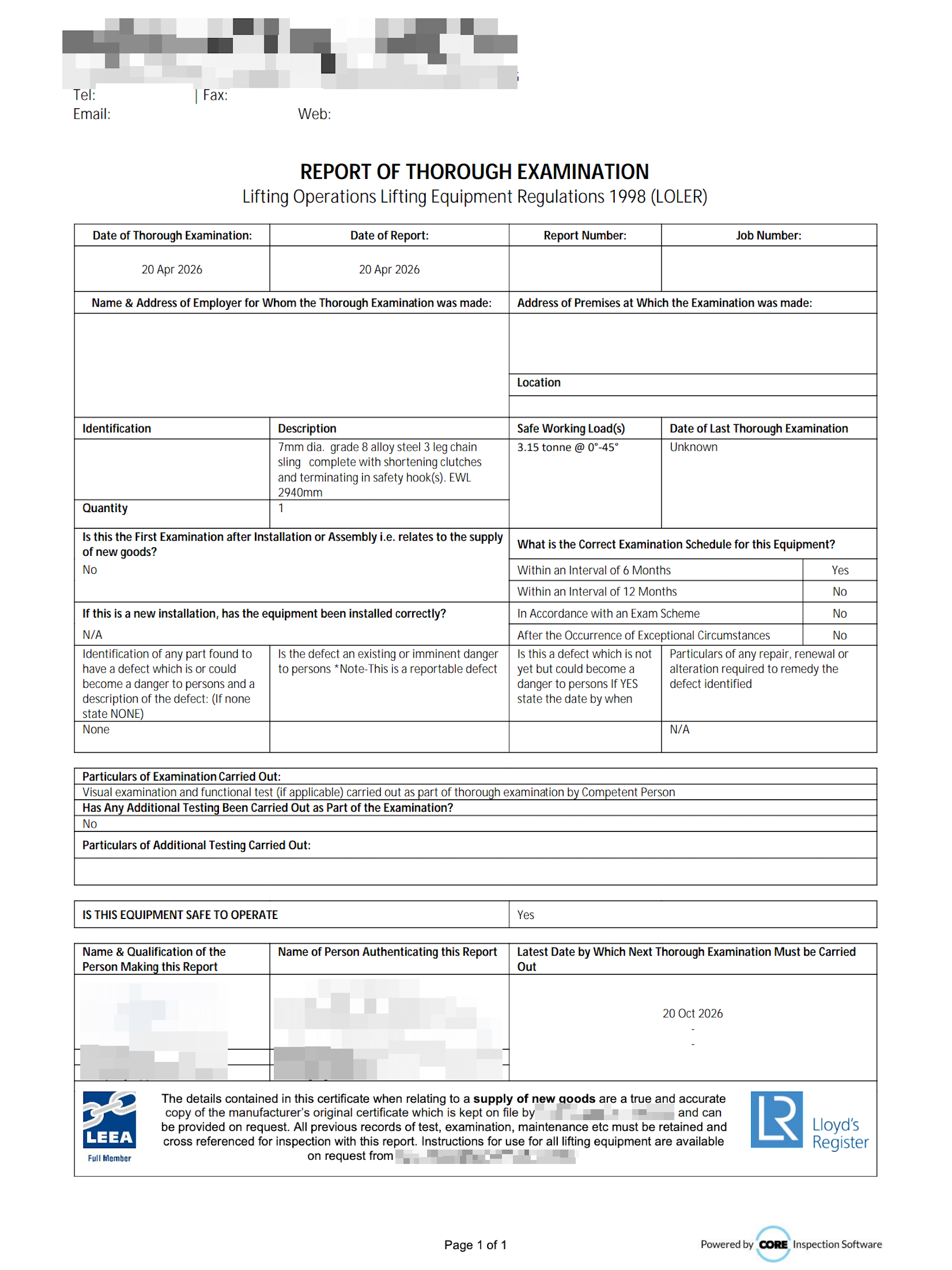
| LOLER 1998, Regulation 9 | Lifting equipment (UK) | Thorough examination every 6 months for accessories and equipment that lifts people, every 12 months otherwise, or to an examination scheme | Report of Thorough Examination |
| AS 2550 | Cranes (Australia and New Zealand) | Pre-operational, routine, and periodic inspections, plus the major inspection at the end of design life | Inspection records and the major inspection report |
From work order to certificate
One job carries the schedule, the inspection, the certificate, and the invoice line.
- 1
Schedule against competency
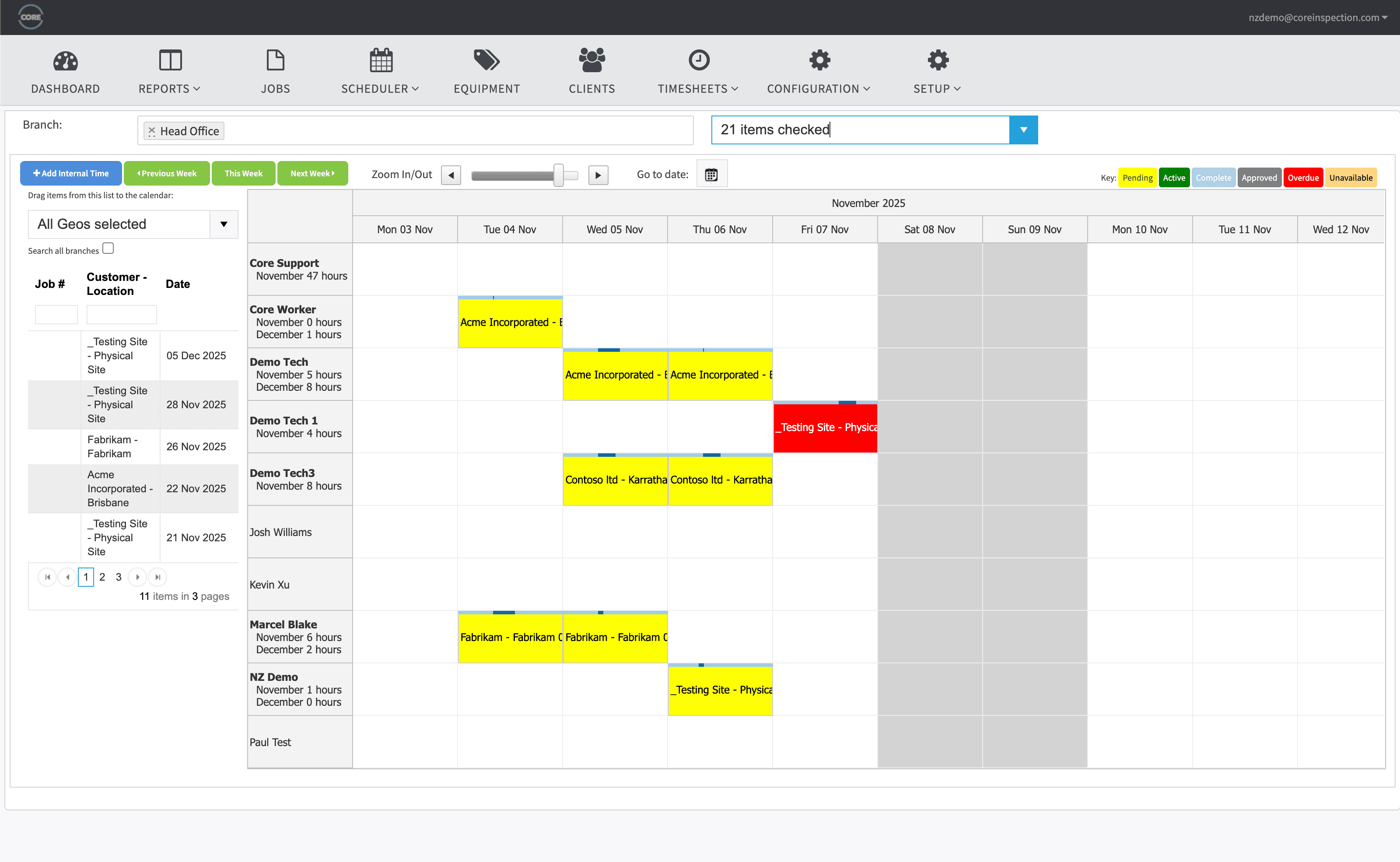
Jobs go on a drag-and-drop calendar. Core holds each technician's qualifications and blocks an assignment they can't sign off, so the annual that needs a qualified person can't be booked to someone who isn't one.
- 2
Inspect in the field
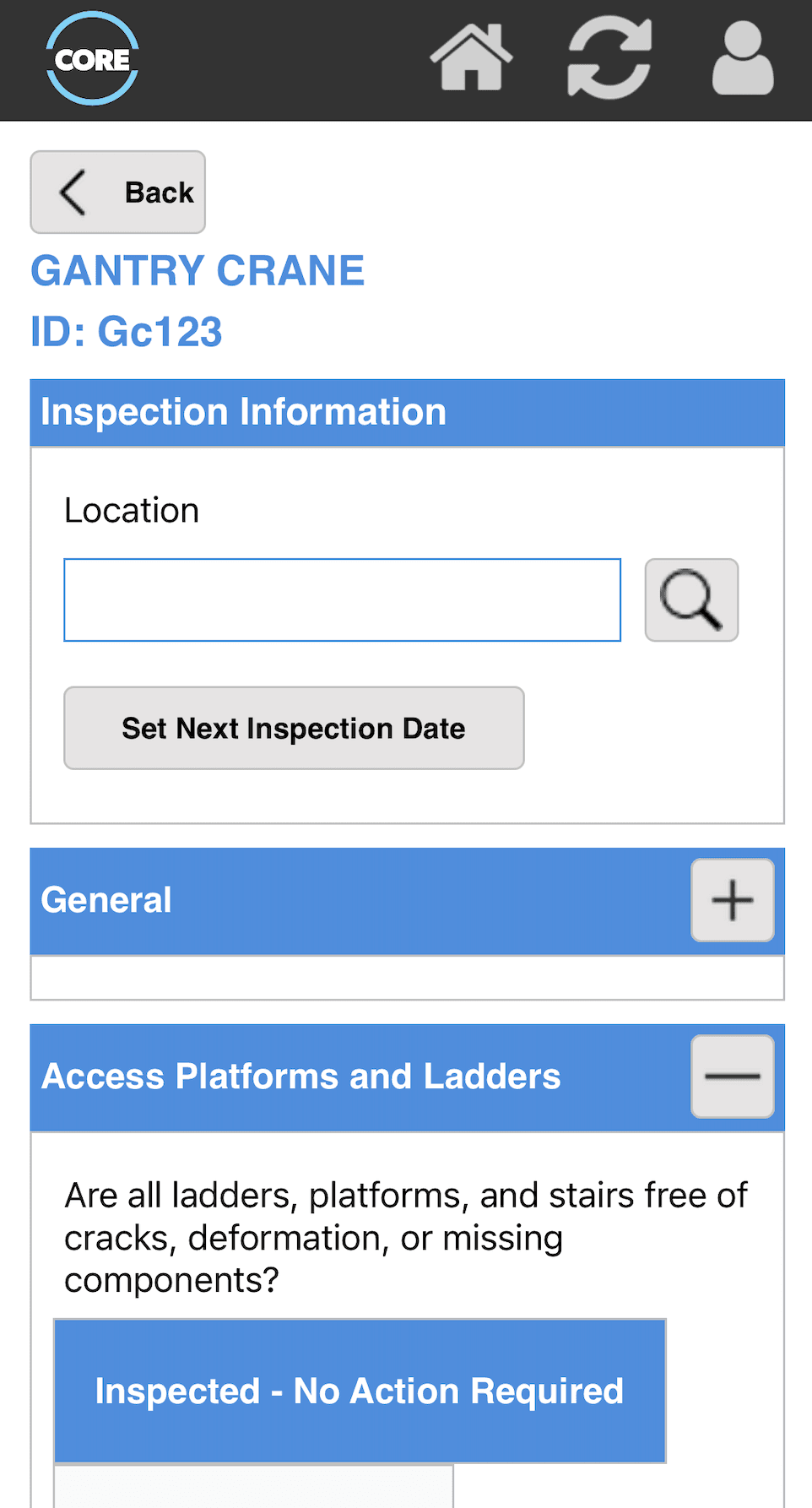
Native iOS and Android apps work fully offline. Technicians scan the asset by RFID, barcode, or QR, run the checklist for that crane type, annotate photos of defects, and capture signatures on the device.
- 3
Approve and issue
Results pass through your approval stages, then render into your own DOCX template as a 1910.179 certification record, a B30.2 periodic report, or a LOLER Report of Thorough Examination.
- 4
Deliver and bill
Certificates reach the customer's portal as one PDF pack per job, and the results roll into a per-customer billing summary for your invoicing run.
Electronic signatures, offline inspections, and the audit trail
The three things buyers ask about a crane inspection checklist app, answered plainly.
Electronic signatures OSHA accepts
OSHA's October 21, 1997 interpretation letter accepts an electronic system in place of a physical signature on 1910.179's monthly certification records, provided it identifies the inspector and stands as their certification. Core captures signatures from the technician, supervisor, or client on the device and stamps them onto the certificate.
Offline inspections
The mobile apps are offline-first. The register and inspection history travel with the technician, inspections complete with no signal in a steel mill or at the top of a tower crane, and everything syncs when the device is back online.
An audit trail your customer can open
Every inspection, change, photo, signature, and document stays attached to the asset and is retained indefinitely. Customers see the same history in their own portal when an auditor asks for it.
A bay of cranes, hoists, and slings in one visit
A crane visit is rarely one crane. It is the bridge crane, its hoist and hook, the jib beside it, and the rack of slings on the wall. Multi-inspect captures the lot as one batch. The technician passes conforming items in bulk, opens only the ones with defects, and issues certificates for the whole visit in one run.
Run a batch inspection in the interactive demoHow Core compares
Where each option fits, including the ones that fit better than Core.
Paper and spreadsheets
Workable for one site and a handful of cranes. They stop working when due dates span hundreds of customer sites and certificates have to reach customers the same day.
See the full feature listInspectAll
The long-standing choice for US overhead crane service companies working to OSHA 1910.179. Core covers a wider equipment family and adds LOLER and AS 2550 for companies with customers outside the US.
Core vs InspectAllGeneral inspection apps
SafetyCulture and similar apps suit owner-operators running their own checklists. Core is built for companies whose business is inspecting and certifying equipment for customers.
Core vs SafetyCultureCrane inspection guides and templates
The standards behind the software, and free checklists you can use today.
- OSHA crane inspection requirements
- ASME B30.2 overhead crane inspection
- ASME B30.16 hoist inspection requirements
- ASME B30.20 below-the-hook lifting device inspection
- AS 2550 crane major inspection
- Crane inspection requirements in Canada
- Crane inspection checklist
- Hoist inspection checklist (ASME B30.16)
- Crane hook inspection sheet (ASME B30.10)
- Below-the-hook inspection record (ASME B30.20)
- Rigging hardware inspection checklist (ASME B30.26)
- Load test certificate
“A very user friendly program and the support team are very helpful if ever required.”
Graeme Beard, Business Analyst, Nobles
Read the Nobles case studyCompliance Standards We Support
Core's forms, certificates, and approval flows are built around the regimes you work to: LOLER, AS/NZS, ASME and OSHA.
- LOLER 1998 (Lifting Operations and Lifting Equipment Regulations), UK
- PUWER 1998 (Provision and Use of Work Equipment Regulations), UK
- BS 7121 (Code of Practice for Safe Use of Cranes), UK
- AS 1418 series (crane design standards), Australia/New Zealand
- AS 2550 series (safe use of cranes, incl. AS 2550.1 inspection requirements), Australia/New Zealand
- ASME B30 (Safety Standard for Cableways, Cranes, Hoists, etc.), USA
- OSHA 1910.179 (Overhead and Gantry Cranes), USA
- OSHA 1926.1400-1442 (Cranes and Derricks in Construction), USA
Frequently Asked Questions
What is crane inspection software?
Crane inspection software holds the register of cranes, hoists, and lifting gear, schedules each asset's inspections at the interval its standard sets, captures the inspection on a phone or tablet, and produces the signed record or certificate the rule asks for. For an inspection company it also carries the service side: jobs across many customer sites, technician competencies, a portal each customer can log into, and a billing handoff.
What is the best crane inspection software for an inspection company?
It depends on where you work and what you inspect. InspectAll is the long-standing choice for US overhead crane service companies working only to OSHA 1910.179. General inspection apps such as SafetyCulture suit owner-operators running their own checklists. Core fits inspection companies that cover more than cranes (slings, hoists, hooks, harnesses, below-the-hook devices), work across OSHA, ASME, LOLER, and AS 2550, or need to batch-inspect a whole site in one visit. Our comparison pages set out where each one is the better choice.
What is the OSHA standard for crane inspection?
Two, depending on where the crane works. 29 CFR 1910.179 covers overhead and gantry cranes in general industry: frequent inspections at daily to monthly intervals, periodic inspections at 1 to 12-month intervals, and monthly certification records for hooks, hoist chains, and running ropes. 29 CFR 1926 Subpart CC (1926.1412 and 1926.1413) covers cranes and derricks in construction: shift, monthly, and annual inspections, with the monthly and annual ones documented. The ASME B30 volumes (B30.2 for overhead cranes, B30.5 for mobile cranes) supply the detailed criteria both rules lean on. Core schedules each inspection class per asset and produces the record each rule asks for.
Does OSHA accept electronic crane inspection records?
Yes. OSHA's 21 October 1997 interpretation letter accepts an electronic system in place of a physical signature on 1910.179's monthly certification records, provided the system identifies the person who performed the inspection and constitutes their certification that the record is true and complete. Core's records carry the inspector's identity, the date, and the asset's serial number or identifier, and they export from the client portal.
How much does a crane inspection cost?
It depends on the crane and the inspection class (a documented monthly on an overhead crane is a different job from an annual comprehensive inspection on a large crawler), plus travel, access equipment, any NDT on hooks or welds, and load-test rigging. For inspection companies, Core rolls inspection results into a per-customer billing summary, so the quote, the inspection record, and the invoice come off the same job.
Can Core handle both OSHA and LOLER crane inspections?
Yes. Core is used by inspection companies in the US, UK, Australia, New Zealand, and Canada. Checklist templates, intervals, and certificate wording are set per standard, so a US customer's 1910.179 monthly certification record and a UK customer's LOLER Report of Thorough Examination come out of the same system, each citing the right rule.
What types of cranes does Core Inspection support?
Core Inspection supports all crane types including tower cranes, mobile cranes, overhead cranes, gantry cranes, jib cranes, loader cranes, and crawler cranes. You can customise inspection forms for any crane configuration.
Can I create custom inspection forms for different crane types?
Yes, Core Inspection includes a form builder that lets you create custom inspection checklists for different crane types, manufacturers, and customer requirements.
How does Core help with LOLER compliance?
Core automatically tracks thorough examination due dates, generates LOLER-compliant reports, maintains full audit trails, and provides dashboards showing compliance status across your fleet.
Can crane owners access their inspection records?
Yes, through the customer portal, crane owners can view their equipment register, download certificates, check compliance status, and see upcoming inspection dates.
Does the mobile app work offline on construction sites?
Yes, the mobile app works fully offline. You can complete inspections without internet connectivity, and data syncs automatically when you're back online.
Free templates & resources
Industry-standard templates and registers: free, editable, ready to brand.
Crane Inspection Checklist
Daily, monthly, and annual examination sheets in PDF and Excel.
View resourceLOLER ROTE Template
Free Report of Thorough Examination template in PDF and Word.
View resourceLifting Equipment Register
Excel + PDF register for lifting gear with conditional due-date formatting.
View resourceExplore Other Industries
The same platform covers cranes, forklifts, lifting equipment, height safety, and internal inspection programs.
Ready to Get Started?
Book a personalised demo and see how Core runs your inspection workflow, from schedule to certificate.