
Forklift Inspection Software for Dealers and Service Companies
Customer fleet registers, planned maintenance and inspection scheduling, offline checklists per truck type, defects that become service work, and a portal for every customer.
Overview
Your customers' operators do the daily check. You own everything that makes it defensible: the planned maintenance visits, the periodic inspections, the repair record behind every tag-out, and the paperwork when a customer asks you to handle compliance. Core keeps each customer's trucks in their own register, schedules the visits to technicians with the right tickets, captures the inspection in the yard, turns a failed item into a job, and puts the report in the customer's portal the moment it is approved.
- Mobile apps for iOS and Android
- Works offline in the field
- Professional PDF certificates
- Customer portal access
Key Features
Forms, scheduling, certificates, and the customer portal, in one system.
Every truck type
Counterbalance, reach, order pickers, pallet trucks, telehandlers and sideloaders, electric, diesel, gasoline and LPG, each with its own checklist variant.
A register per customer
Every customer's fleet in its own register: serial, model, fuel type, attachments, site, and the inspection and service history behind each truck.
Planned maintenance and inspection scheduling
Each truck on the interval you set, with three-tier overdue alerts and jobs grouped by site so a technician clears a whole customer in one visit.
Checklists per truck type
Key-off and key-on sections with electric, IC and LPG items, built on OSHA's eTool and adapted to your service inspection and PM scopes.
Defects that become service work
A failed item tags the truck out, and the repair goes on as a job with parts and time captured against it, so the defect and the fix stay on the same truck.
Service reports and certificates
Inspection reports, PM records and thorough examination reports rendered from your own DOCX templates, one PDF pack per visit.
Photos and signatures
Annotated photos of forks, chains, tires and leaks, with technician and customer signatures captured on the device.
Customer portal, unlimited logins
Every customer sees their own trucks, open defects, upcoming inspections and every report, without phoning your office and without a per-seat fee.
What forklift inspection software has to do for a dealer
A forklift carries two kinds of inspection. The daily examination under OSHA 1910.178(q)(7) belongs to the operator and does not have to be written down. The planned maintenance and periodic inspections belong to whoever services the truck, and those records are what an inspector, an insurer or a customer asks for after an incident. Forklift inspection software keeps the second kind: which trucks are due, who inspected them, what failed, what was repaired, and the report that proves it.
For a dealer or an independent service company the job is wider. The register spans hundreds of customer sites, each with a mix of electric warehouse trucks and LPG yard trucks on different intervals. Technicians hold different tickets. Each customer wants to see their own trucks and their own reports. Core is built for that business: scheduling, field inspection, defects that become jobs, reports, customer portals, and the billing handoff in one system.
Inspection and maintenance regimes by rule
Each truck in Core carries the regime of the rule it works under, with its own due dates and the record that rule expects.
| Rule | Applies to | What it requires | Record |
|---|---|---|---|
| OSHA 29 CFR 1910.178(q)(7) | Powered industrial trucks, general industry (US) | Examination before placing in service, at least daily, and after each shift on round-the-clock operations. Performed by the operator | No written record required by OSHA; a completed checklist is the evidence |
| OSHA 1910.178(p)(1) and (q)(1) | Defects found on any truck (US) | Truck removed from service until restored to safe operating condition; repairs by authorized personnel | Defect report, tag-out, and the repair record behind it |
| ANSI/ITSDF B56.1 | Low lift and high lift trucks (design and maintenance standard) | Planned maintenance to the manufacturer's recommended procedures and intervals, usually by hours of use | PM record per truck |
| OSHA 29 CFR 1926.602 | Industrial trucks on construction sites (US) | Trucks in use meet ANSI B56.1-1969 for inspection, testing, maintenance and operation; operator training as 1910.178(l) | Inspection and maintenance records to B56.1 |
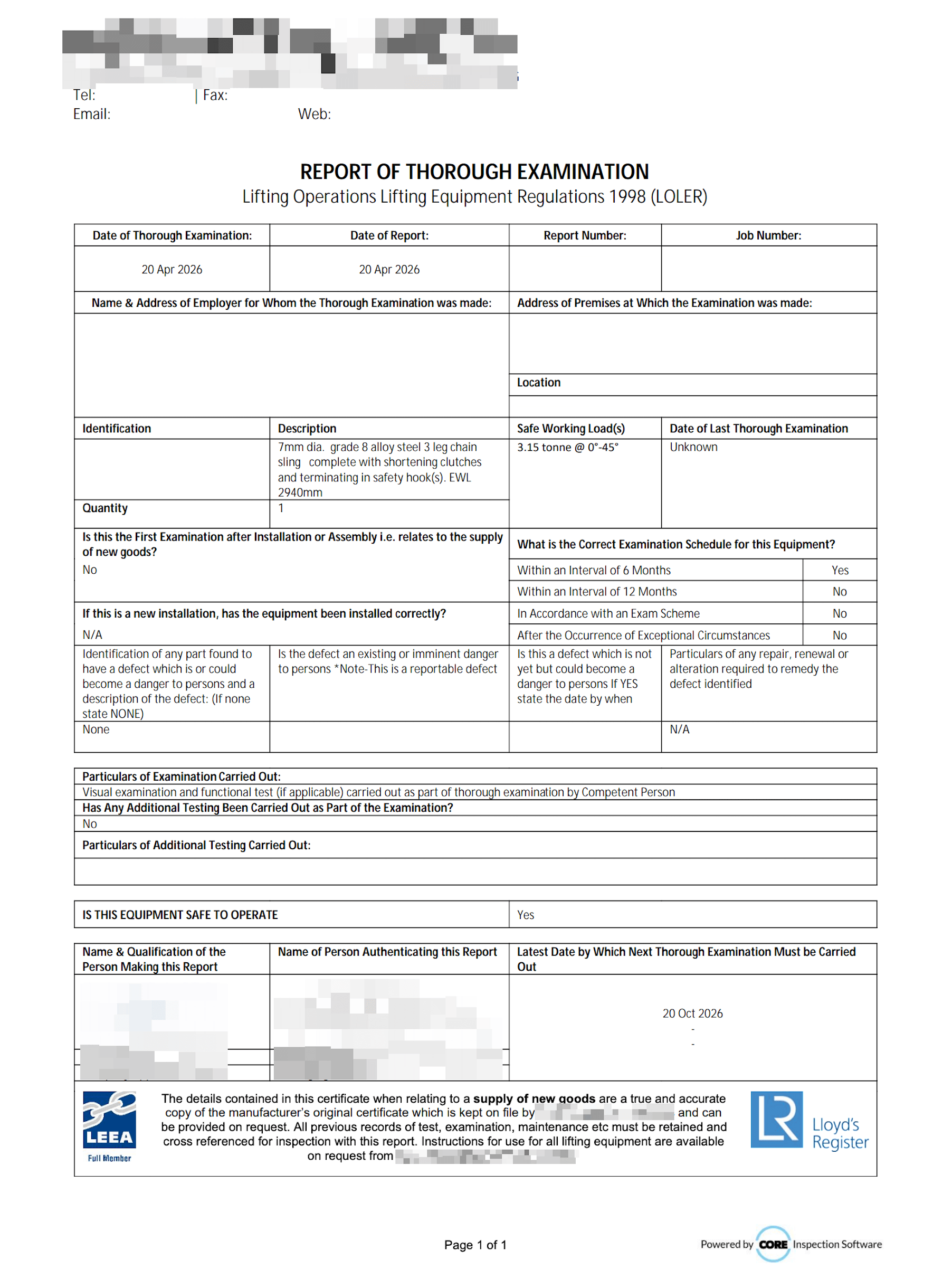
| LOLER 1998, Regulation 9 | Forklifts as lifting equipment (UK) | Thorough examination every 12 months, or every 6 months if the truck lifts people | Report of Thorough Examination |
| PUWER 1998 | Forklifts as work equipment (UK) | Maintained in efficient working order; inspected where deterioration could lead to a dangerous situation | Maintenance log and inspection records |
| CSA B335 | Lift trucks (Canada) | Pre-use inspection by the operator and maintenance to the manufacturer's schedule | Inspection and maintenance records |
From PM schedule to service report
One job carries the visit, the inspection, the repair, the report and the invoice line.
- 1
Schedule by customer and site
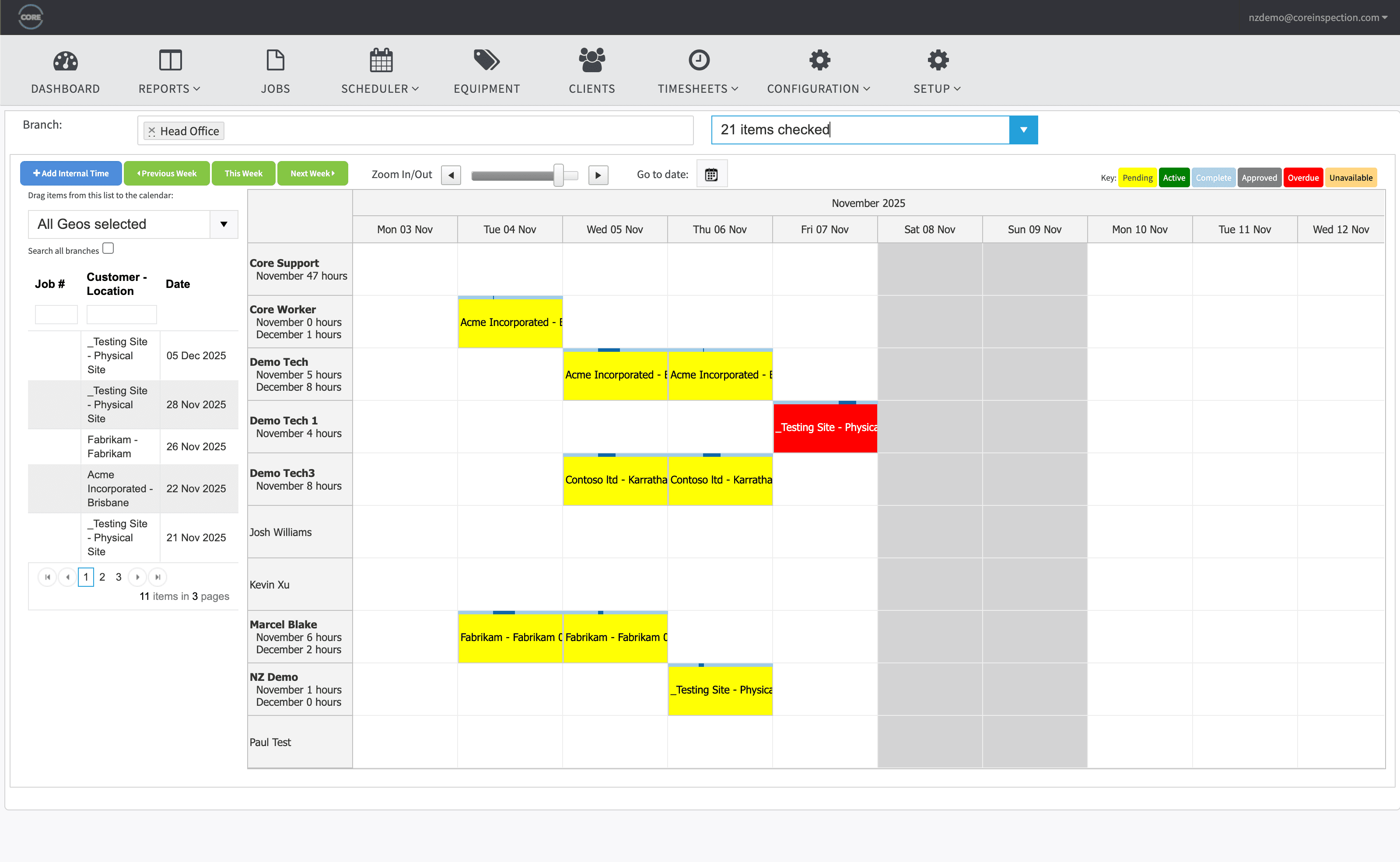
PM visits and inspections go on a drag-and-drop calendar, grouped by site so one trip clears every truck due at that address. Core holds each technician's qualifications and blocks an assignment they can't sign off.
- 2
Inspect in the yard
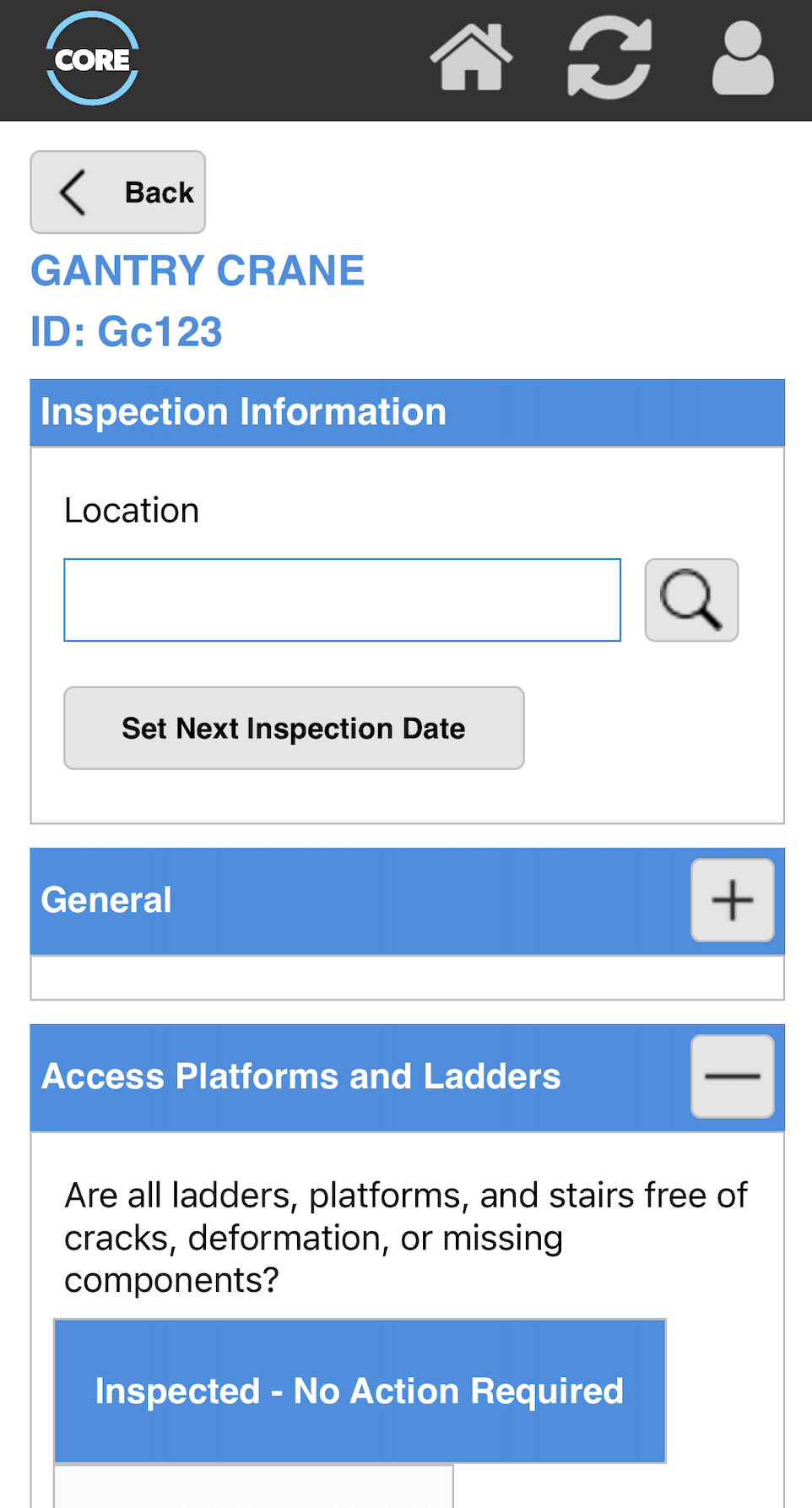
Native iOS and Android apps work fully offline. The technician scans the truck by RFID, barcode or QR, gets the checklist for that truck type and fuel, photographs the fork heel or the leak, and tags the truck out on the spot if it fails.
- 3
Turn the defect into a job
A failed item raises the repair as a job with parts and time captured against it. Results pass through your approval stages, then render into your own DOCX template as the service report, PM record or thorough examination report.
- 4
Deliver and bill
Reports reach the customer's portal as one PDF pack per visit. The results roll into a per-customer billing summary for your invoicing run, with Xero and HubSpot integrations if you use them.
The tag-out trail, offline work, and hire trucks
The three things dealers ask about first, answered plainly.
The tag-out trail
1910.178 is three clauses working together: report the defect, take the truck out of service, repair it by authorized personnel. Core keeps all three on the asset, with the photo, the technician's name, the date, and the job that closed it, so the trail holds up when one customer has an incident.
Offline in the yard
Cold stores, steel yards and container terminals rarely have signal where the trucks are. The apps are offline-first: the register and history travel with the technician and sync when the device is back online.
Hire fleet included
Trucks on hire carry their inspection status with them. Core shows which truck is at which customer and since when, and a returned truck shows its inspection status before it goes out again.
Forty trucks at one distribution centre, one visit
A fleet visit is rarely one truck. It is the reach trucks in the racking, the counterbalances on the dock, the pallet trucks and the order pickers, and often the slings and the dock leveller beside them. Multi-inspect captures the lot as one batch. The technician passes conforming trucks in bulk, opens only the ones with defects, and issues the reports for the whole visit in one run.
Run a batch inspection in the interactive demoWhere Core fits beside what you already run
Telematics, your DMS and general inspection apps each do a different job. Here is where each one fits, including the ones that fit better than Core.
OEM telematics
Crown InfoLink, Toyota T-Matics and similar systems give you impact events, access control and utilisation from a box on the truck. They do not hold the inspection and repair record a service company is accountable for. Most dealers run both.
See what Core holdsDealer management systems
Your DMS or ERP runs parts, sales, rental billing and the general ledger. Core sits beside it as the inspection and service record, and hands billing summaries across rather than replacing it.
IntegrationsGeneral inspection apps
SafetyCulture and similar apps suit a warehouse running its own daily checks on its own trucks. Core is built for companies whose business is inspecting and servicing other people's fleets.
Core vs SafetyCultureForklift inspection guides and templates
The rules behind the software, and free checklists you can use today.
“The team at Core have been so reactive to any changes or improvements we've needed to suit our business.”
Andy Campbell, Technical Services Manager, Bunzl Safety & Lifting
Read the Bunzl Safety & Lifting case studyRules and standards we work to
Core's forms, certificates, and approval flows are built around the regimes you work to: LOLER, AS/NZS, ASME and OSHA.
- OSHA 29 CFR 1910.178 (Powered Industrial Trucks), USA
- OSHA 29 CFR 1926.602 (Material Handling Equipment, construction), USA
- ANSI/ITSDF B56.1 (Safety Standard for Low Lift and High Lift Trucks)
- CSA B335 (Safety Standard for Lift Trucks), Canada
- LOLER 1998 and PUWER 1998, UK
- AS 2359 series (Powered Industrial Trucks), Australia
Frequently Asked Questions
What is forklift inspection software?
Software that holds a register of forklifts, schedules each truck's inspections and planned maintenance, captures the inspection on a phone or tablet against a checklist for that truck type, and produces the report or certificate afterwards. For a dealer or service company it also carries the service side: jobs across many customer sites, technician competencies, a defect that turns into a repair, a portal each customer can log into, and the billing handoff.
How is this different from forklift fleet management software?
Forklift fleet management software usually means OEM telematics such as Crown InfoLink or Toyota T-Matics: impact sensors, access control, utilisation and battery data from a box on the truck. Core is the other half of the job, the one a service department owns: the inspection and maintenance record. Which trucks are due, who inspected them, what failed, what was repaired and when, and the certificate that proves it. Many dealers run both. Telematics tells you a truck hit a rack; Core holds the inspection that tagged it out and the job that fixed it.
Does OSHA require forklift inspection records?
Not for the daily examination. 1910.178(q)(7) requires the examination before each shift, and OSHA confirmed in two 2000 interpretation letters that it does not have to be written down. The record matters anyway: it is the only evidence the examination happened, and the defect trail from (q)(7) to the (p)(1) tag-out to the (q)(1) repair by authorized personnel is what an inspector asks for after an incident. Our OSHA forklift inspection requirements guide covers the rule clause by clause.
Who does the daily check, the customer or the dealer?
The customer's operator, before each shift. The dealer or service company owns everything that makes that check defensible: the planned maintenance visits, the periodic service inspections, the repair record behind every tag-out, and increasingly the checklist programme itself when a customer asks their service provider to handle compliance. Core is built for that second job. The customer's trucks sit in their own register, your technicians inspect and repair them, and the customer sees the history in their portal.
Can we schedule planned maintenance as well as inspections?
Yes. Each truck carries the intervals you set, so a 90-day PM, a six-month service inspection and a 12-month thorough examination can all run on the same asset with their own due dates and their own checklists. Jobs group by customer and site, so one visit clears every truck that is due at that address.
Do the checklists differ for electric, IC and LPG trucks?
Yes. The walk-around and the key-on operational checks are the same for every truck. Electric trucks add the battery, restraint and cable items; internal combustion trucks add oil, coolant, belts, hoses and the air cleaner; LPG trucks add tank mounting, the relief valve and a leak check. Core holds a checklist variant per truck type and fuel, and the technician gets the right one when they scan the truck.
Does the mobile app work offline inside a warehouse or a yard?
Yes. The iOS and Android apps are offline-first. The customer's register and inspection history travel with the technician, inspections complete with no signal in a cold store or a steel yard, and everything syncs when the device is back online.
What does a UK forklift need under LOLER?
A forklift is lifting equipment under LOLER 1998, so it needs a thorough examination by a competent person at least every 12 months, or every 6 months if it is used to lift people, for example with a work platform attachment. PUWER 1998 covers maintenance and inspection of the truck as work equipment. Core schedules both, and the thorough examination produces a Report of Thorough Examination from your own template.
Can we track hire trucks as well as customer-owned ones?
Yes. Core tracks hire equipment: which truck is out, with which customer, since when, and its inspection status, so a truck comes back onto the hire fleet with its history intact and you can see whether it is in date before it goes out again.
What does Core cost for a forklift dealer?
A fixed quote, based mainly on the number of active mobile technicians and the modules you use, with no per-inspection charges. Customer portal logins are unlimited, so a dealer with 300 accounts pays nothing per customer for 300 portals. The pricing page explains what moves the number.
Free templates & resources
Industry-standard templates and registers: free, editable, ready to brand.
Forklift Inspection Checklist
Every daily item on one page, free PDF, plus Word and an Excel weekly log.
View resourceOSHA Forklift Inspection Requirements
1910.178 clause by clause: the daily exam, tag-outs, training, construction sites.
View resourceLifting Equipment Inspection Software
The same workflow for slings, hoists, hooks and rigging gear you service alongside the trucks.
View resourceExplore Other Industries
The same platform covers cranes, forklifts, lifting equipment, height safety, and internal inspection programs.
Ready to Get Started?
Book a personalised demo and see how Core runs your inspection workflow, from schedule to certificate.