Dashboard Reports
The three per-user dashboard reports (Jobs Not Approved, Active Jobs, and Job Hours Scheduled Next 5 Weeks) with their grace-day and alert threshold settings.
Last updated
The dashboard surfaces three per-user reports that summarise the state of jobs assigned to you. Each one can be configured by an administrator with thresholds that control when the alert turns orange or red.
Jobs Not Approved

This report shows you jobs that have been completed but not yet marked as approved in Core. The purpose of this report is to allow you to identify if you have a large number of jobs that have not been invoiced.
A description of the parameters is as follows.
| Parameter | Description |
|---|---|
| Number of grace days | This determines the number of days since a job's completion that must pass for it to be included in the count of jobs not approved. For example, if this is set to 20, then the job must have been completed at least 20 days ago but not approved to be included in this count. |
| Warning number of jobs | The threshold number of jobs after which this alert will display as orange. |
| Critical number of jobs | The threshold number of jobs after which this alert will display as red. |
Active Jobs

This report shows active jobs that are assigned to your login. The purpose of this report is to let you know if you have jobs currently assigned to you.
Job Hours Scheduled — Next 5 Weeks
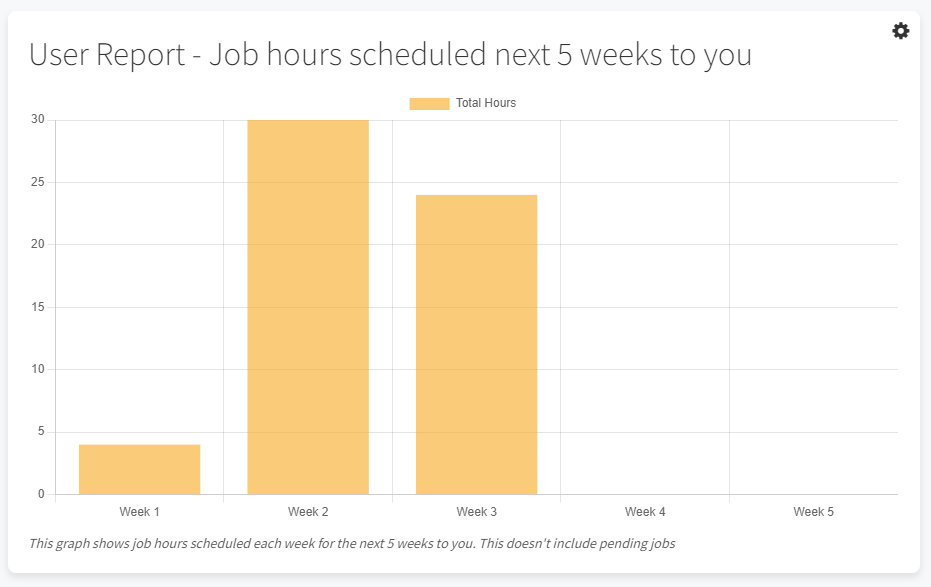
This report shows you the job hours scheduled over each of the next 5 weeks to you. Week 1 is one week out from now. For example, if today's date was the 1st of January, then week 1 would be the week beginning 8th of January.
The purpose of this report is to easily identify if you have weeks where you are underutilised.
The parameters for this report are as follows.
| Parameter | Description |
|---|---|
| Warning Level | This is the level below which the graph colour will change to orange. |